I’m working on OpenIn for iPhone and iPad. Before it’s out, I’d like to hear from you: what do you expect from OpenIn on iOS?
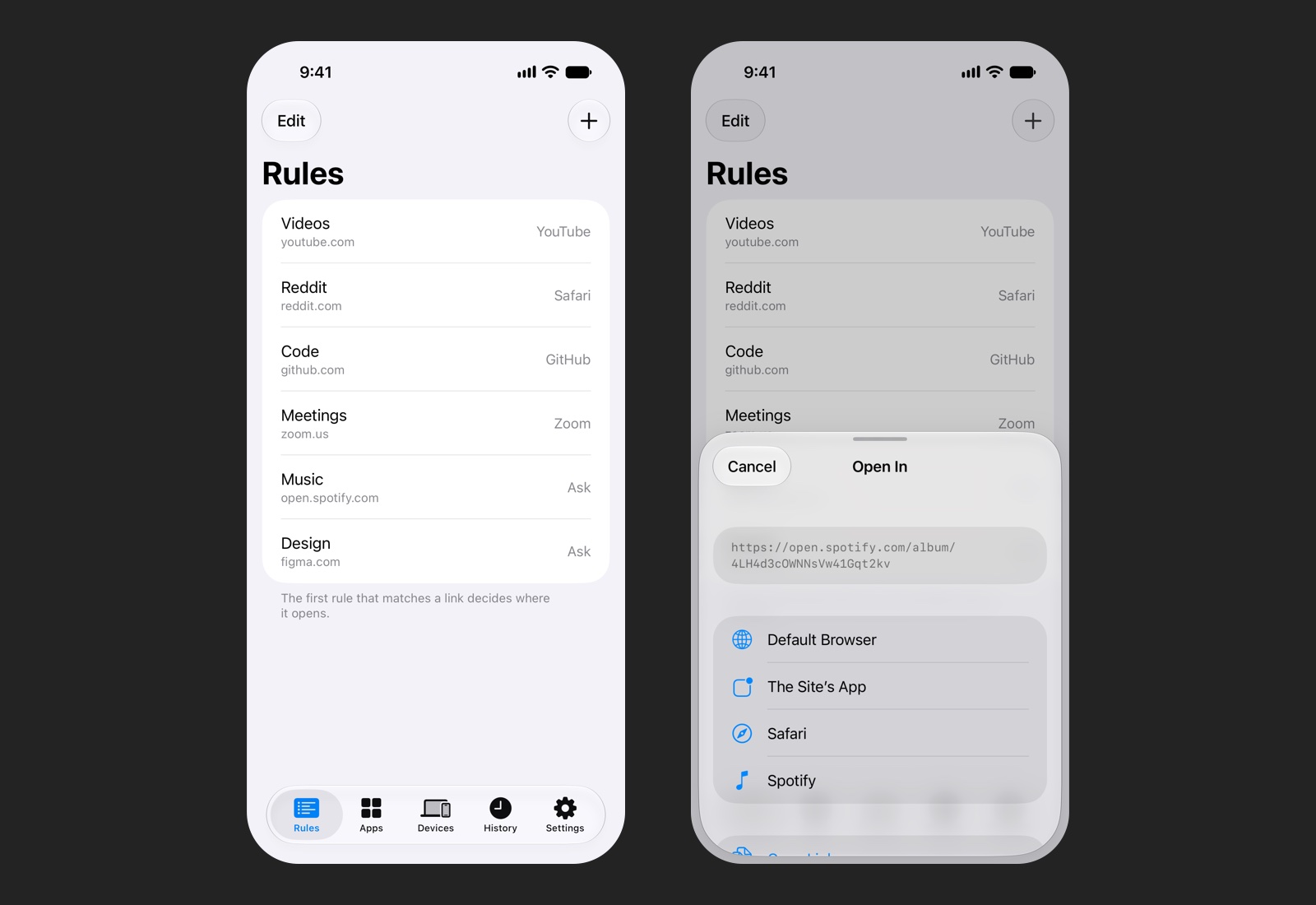
It can’t be the Mac app on a phone
On the Mac, OpenIn is your default browser, so every link you click goes through it. iOS lets only browsers be the default browser, so OpenIn can’t see every link you tap in every app. iOS also doesn’t tell an app which app a link came from, and there are no browser profiles to pick, no modifier keys and no scripts. So on iOS, OpenIn works with the links you hand it: in Safari, from the share sheet, from Shortcuts, a link you copied, and links from your other devices.
What I’m planning for the first version
- Rules: links from the sites you choose open in a browser, in the site’s own app (YouTube, Spotify, GitHub, Zoom and a few dozen more), or in a picker that asks.
- Safari extension: links you tap in Safari go where your rules say. When a rule sends a link to another browser or app, Safari asks to open it there; iOS doesn’t allow anything quieter.
- Share sheet: open a link in another browser or in the site’s app, or send it to another device.
- Copied links: copy a link, open OpenIn, and it offers to open it.
- Send links between your iPhone, iPad and Mac: a link you send to your Mac goes through your Mac’s rules.
- Clean links: tracking parameters removed and redirect links (Outlook Safe Links, Google) opened to the real address, before your rules see them.
- Shortcuts actions, History, and rules that sync between your iPhone and iPad through iCloud.
- iPhone, iPad and Apple Vision Pro, in the same 10 languages as the Mac.
If you bought OpenIn on the Mac App Store or have a license from this website, OpenIn for iOS will be included.
What would make it useful for you? Which apps should it know, and what do you do with links on your phone today? Write to me at support@loshadki.app.
OpenIn 4.6 for the Mac
The next Mac update is nearly ready:
- Clean links: tracking parameters (
utm_…,fbclidand friends) removed and the real link opened behind redirect links (Outlook Safe Links, Google, Facebook…) before your rules run. On by default, with a list of sites to leave alone. - Desktop apps: Teams, Zoom, Figma, Spotify, Notion, Linear and Discord links open in their apps, in the form each app understands. Settings adds a rule for each one with a click.
- Web apps you installed from Chrome, Edge or Brave as places to open links.
- The picker: Control-click opens a link in the background, Option-click shares it.
- When no rule matches: pick the app from Settings, the menu bar or Shortcuts.
- Settings → Apps: replace an app everywhere at once (Photoshop 2025 → 2026), remove the ones that are gone, and see when each one was last used.
- Scripts get the name of the app entry they run for, so one script can serve several Dia profiles, and the Firefox extension can have a keyboard shortcut.
What should OpenIn do next, on the Mac or on iOS? Feature requests are welcome at support@loshadki.app.
ReadAll is on the App Store
ReadAll, my feed reader for iPhone, iPad and Mac, is out on the App Store, and it’s free: no ads, no account, no tracking.